The X Audio System shares many goals with the X Window System. Network transparency allows an application to use audio devices on the same machine, or on any other machine on the network. Hardware independence allows programs to be written once, but usable for a wide variety of audio hardware. Device sharing allows multiple applications to use the audio hardware simultaneously. A C compatible common application programming interface (API) allows programs to be portable across different platforms. And extensibility allows vendors to add additional capabilities.
There are other goals for audio services that are not shared with the core X protocol. For example, notions of security, compression, and cooperation with other media have been built into the core audio protocol. These allow better integration into a larger infrastructure, currently known as Broadway. Please see Scheifler, Broadway: Universal Access to Interactive Applications over the Web, also in these Proceedings, for more information on the overall Broadway infrastructure.
Finally, the X Audio System has been designed to make writing simple programs simple, with the remainder of the system learnable on an incremental basis. The programming model has been designed to fit well with toolkits, so that a single programming style can be utilized throughout an application.
The X Audio System defines three components: the API that the client uses to interact with the library, the protocol that the library uses to interact with the server, and the objects that the application manipulates via the library and protocol. Objects exist on both the client and server sides, depending on what services they abstract.
The object model uses the notion of classes. A class defines a list of values called attributes and defines the meaning of each of these attributes for that class and what happens when these attributes change. Unlike some object models, the X Audio object model defines only a few methods (or requests) on the object: create, destroy, get, set, and (for some objects) read and write.
The protocol and C API are relatively small, since they provide a generic mechanism to create, destroy, modify, and query objects. The complete client visible state of the server and library is presented as a collection of objects. The classes of these objects are defined in the protocol and library specifications. The system provides pre-created instances of some of these classes, and the application may create instances of some classes. It is not intended for applications to subclass from these classes.
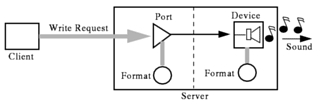
A simple case is where an application has samples in its memory and would like to play them. To do this, the application takes the following steps:
Figure 1: An application writing samples to an output device.
In the above figure, the port object receives the audio samples in the client's format and timeline. The format of the client's audio samples is defined by the format object attached to the port. The port object converts the samples to the format of the device and schedules the samples to the timeline of the output device for playback.
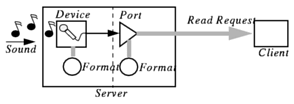
To record samples, the process is very similar, except that the client creates a port object that makes the audio samples from the default input device available for reading, and then the client fetches samples from the port. In Figure 2 below, client created objects are shown to the right of the vertical dashed line.
Figure 2: An application reading samples from an input device.
There are several other classes of objects in the server. For example, bucket objects temporarily store audio clips in the server, waveform objects generate synthetic audio signals, and other classes exist which are used for access control. Triggers provide notification to client applications whenever a targeted set of attributes change or an error occurs. In fact, the entire client-visible state of the server is presented as attributes on instances of the various classes.
XaErrorCode playUlawBuffer(void *buf, int numSamples)
{
    XaAudio      aud;
    XaTag        outputPort, fmt;
    int          numBitsToProcess = numSamples * 8;
    int          numBitsProcessed = numBitsToProcess;
    XaErrorCode  err = XaEsuccess;

    /* Open a connection to the audio server. */
    aud = XaOpenAudio();

    /* Get a ulaw format object so that we can specify what kind
       of data we wish to send */
    fmt = XaFind(XaCFormat, "ulaw");

    /* Create a port onto the default output device.

       Setting the input device to XaTclient tells the server
       that the client will be writing to the port.
       The output device will be automatically set to the
       default output. */
    output = XaCreate(aud, XaCPort,
                      XaNinputBuffer, XaTclient,
                      XaNformat, fmt);

    while((numBitsToProcess > 0) && (err == XaEsuccess))
    {
        err = XaWrite(aud, output, (XaTime) 0, XA_LATEST_TIME,
                      buf, numBitsToProcess, 0, &numBitsProcessed);
        numBitsToProcess -= numBitsProcessed;
    }

    XaDestroy(aud, outputPort);
    XaCloseAudio(aud);
    return err;
}
See also Scheifler, R., Broadway: Universal Access to Interactive Applications over the Web, elsewhere in the XTECH '96 Proceedings (slides at ftp://ftp.x.org/contrib/conferences/XTech96/broadway-scheifler.ps).
X Consortium Inc.
201 Broadway, 7th floor
Cambridge, MA 02139